
How to run a airdrop on Arc and distribute your token across up to a thousand wallets
Learning how to run a airdrop on Arc comes down to one tool: the multisender sends your ERC-20 to up to a thousand addresses in a single signed transaction, with an edge you won’t find on any other chain: you know exactly what you’re going to pay before hitting the button, because the number is denominated in USDC.
Anyone who has run airdrops on other networks knows the drill: you budget the distribution with the native coin at one price and end up signing at another because prices keep moving. On Arc, gas is paid in USDC, so the quote doesn’t shift between calculating and signing. Below you’ll find the full process and the exact math depending on the size of your list.
Before running a Airdrop on Arc, here’s what you need
- The token in your wallet, with enough balance to cover the sum of everything you plan to distribute.
- USDC for the fee and gas. Since it’s Arc’s native currency, a single asset covers both (check our guide on how to bridge to Arc from any blockchain if you don’t have funds in your wallet).
- The recipient list, which you can bring in a file or let the tool pull it automatically.
How to run a airdrop on Arc step by step
The Arc Token Multisender by Smithii bundles the entire distribution into one operation: a single signature handles what would otherwise be hundreds of separate transfers. On top of that, it validates every address before sending anything, so a typo is filtered out without burning fees. Here’s what the interface looks like:
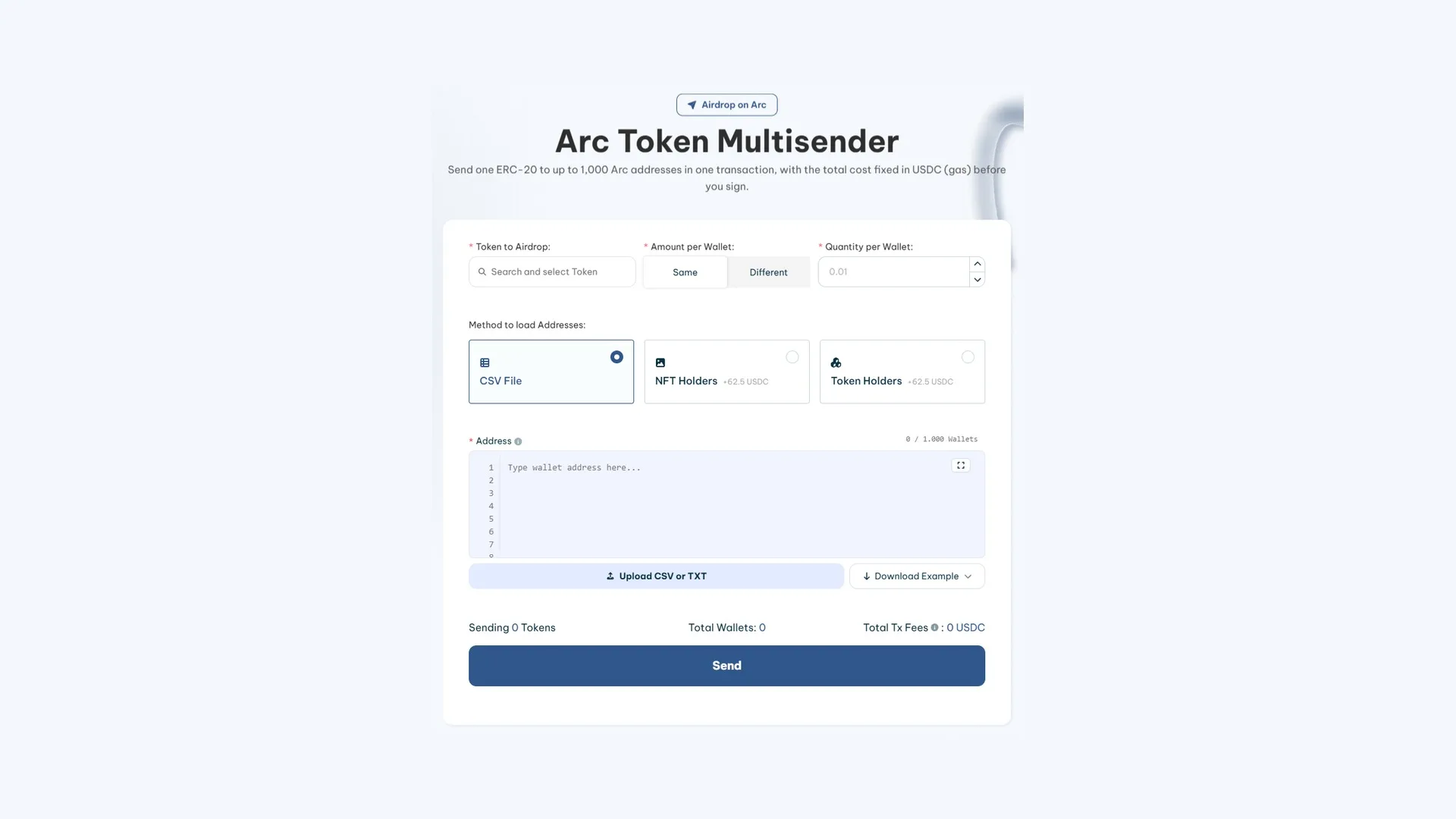
With the token and USDC ready in your wallet, the bulk send on Arc works like this:
- Connect your EVM wallet to the network. That same address supplies the tokens for the distribution and the USDC that settles everything.
- Search for your ERC-20 in the first field of the form and pick it from the list that shows up.
- Set the distribution rule: either an equal amount for everyone, or a custom amount per address if you’re rewarding by tiers.
- Bring in the addresses using any of the three options: upload a file, paste them straight into the box, or auto-pull the holders of a token or a collection.
- Check the summary at the bottom before anything else. It shows how many units go out, how many addresses receive them, and what you’re paying for the whole thing.
- Fire the send and sign in your wallet. The full batch travels in one operation.
How much a airdrop on the Arc network costs with Smithii Tools
The fee is 0.37 USDC per recipient, so budgeting is just a matter of multiplying. Since gas is also charged in USDC, the total lands as a dollar figure you can work out in advance:
| Recipients | Fee |
|---|---|
| 100 wallets | 37 USDC |
| 500 wallets | 185 USDC |
| 1,000 wallets | 370 USDC |
Here’s where Arc pulls ahead of any other chain in practice. On a regular network, you plan the distribution with the native coin at one price and sign hours later at a different one, so the budget you approved and the amount you actually pay don’t match up. On Arc, the number you see in the form is the number that leaves your wallet, with zero drift.
For a small distribution the difference is negligible. On a batch of a thousand addresses, where the fee sits around 370 USDC, a 15% price swing means over fifty dollars appearing out of nowhere between the moment you approve and the moment it executes. That’s where it starts to hurt.
How to use a multisender on Arc with your own list
A lot of people assume you have to paste addresses by hand and only later realize you didn’t need to. There are three loading methods, and two of them build the list for you.
- CSV File, no extra cost: upload a CSV or TXT file, or paste the addresses directly. This is the way to go when you already have the list ready, whether it came out of a form, a giveaway, or your own database.
- Token Holders, for 62.5 USDC: the tool pulls the wallets that hold a specific token. Useful to reward the holders of your own or to reach the holders of a related project.
- NFT Holders, also for 62.5 USDC: same idea but with holders of a collection, which is the way to reward a NFT community with a fungible token.
One limit to keep in mind when building the list: each send supports up to 1,000 wallets. That’s a hard product cap, so a bigger distribution needs to be split into several rounds, each with its own signature and its own fee.
If your distribution goes over that number, plan the split before you start. Breaking it up by balance tiers or by holder seniority makes more sense than slicing the list alphabetically, since it lets you fine-tune the amount for each round and, if something goes sideways halfway through, know exactly which group didn’t get paid.
If you haven’t deployed the contract yet, start by creating your ERC-20 on Arc
What to check before sending a token to multiple wallets on Arc
The automatic filter covers broken addresses for you. The real issue is different: an address can be perfectly well formed and still not be the one you meant to reward, and no validator can catch that.
- Duplicates. When you merge two sources it’s easy for the same address to show up twice, and then it gets paid twice and costs you double fee. Dedupe the file before uploading it.
- Team addresses sneaking into the distribution. This almost always happens when the list comes from a snapshot, since you’re also on the record as holders of the token.
- Contracts instead of people. A contract that isn’t built to receive tokens will leave them locked with no way for anyone to recover them.
- That the balance is enough. Add up what you’re about to distribute and check it against what’s in the wallet; if it falls short, the operation fails before it even runs.
FAQ
How much does a token bulksend on Arc cost?
It works out to 0.37 USDC per recipient, and network gas is also settled in USDC. In practice: 37 USDC for a hundred addresses, 370 USDC if you fill the batch all the way to a thousand. Using the automatic holder extraction instead of your own file adds 62.5 USDC on top of that.
How many wallets can I send to at once?
Up to 1,000 addresses in a single transaction. It’s a product cap, so bigger distributions have to be split across multiple runs, each with its own signature and its own fee based on the number of recipients it includes.
Can I send different amounts to each wallet?
Yes. Under Amount per Wallet you pick between Same, which sends the same amount to everyone, and Different, which lets you assign a specific amount to each address. The second option is the usual pick when the distribution rewards by tier or by seniority.
What happens if an address is malformed?
It gets dropped before anything goes out, so you don’t burn fee on it. That safety net covers malformed addresses, but not ones that are perfectly written and still shouldn’t be there, like a duplicate or a team wallet. Those you have to catch by reviewing the file yourself.
Why doesn’t the cost change between the estimate and the signature?
Because on Arc both the fee and the gas are paid in USDC, the network’s native asset. On any chain with a volatile native asset, the dollar amount shifts with the price at the moment of signing; here nothing moves between the quote and the execution.
Conclusion
Batch distribution wraps up in a single signature what would take hours of repetitive work by hand, and on Arc it adds something rare: you can approve the budget knowing that number is the final one, since there’s no price feed in the middle.
What still comes down to you is who ends up on the list and with how much. Broken addresses get filtered by the tool; duplicates and wallets that shouldn’t be there do not.

Content creator and SEO contributor at Smithii. Systems Engineering student and crypto-tech enthusiast.



