

How to Remove Raydium Liquidity
If you have a Token project on Solana, Liquidity Pool is something you need to understand. In this post, we’ll show you how to Remove Raydium Liquidity in just a few seconds.
You can remove liquidity from your Token on Solana as soon as you’ve added it. Literally, any time you want. We’ll walk you through it in under a minute, no coding required.
If you prefer the video version, check it out below:
También te podrá interesar cómo crear un Liquidity Pool en Solana y ser el primero en comprar (bundle).
What to Know Before Removing Liquidity on Raydium
Before we dive in to the step-by-step tutorial on removing Raydium liquidity, let’s cover a few key concepts.
Raydium is a leading decentralized exchange (DEX) on the Solana blockchain that lets users create and manage liquidity pools.
Here’s how it works on-chain: you have your new token with no value yet, say its ticker is $SMITHII, and you pair it with a token that has value, like $SOL. You deposit both tokens in whatever amounts you choose and receive a token pair, or LP token, with the symbol $SMITHII/$SOL.
Whoever holds the token pair, or LP token, controls the liquidity pool. Removing liquidity means withdrawing the tokens you deposited into a Raydium liquidity pool.
Important: if you’ve already burned your token pair or LP token, they no longer exist and liquidity removal is no longer possible. This is a step many teams take to build trust in their liquidity pool.
Talk to Your Investors Before Pulling Funds
Even though it’s already hard to get buyers if your liquidity isn’t locked, you should always consult your investors before making a withdrawal. Depending on the size of the withdrawal, it can create legal exposure for market manipulation or fraud. That said, there are situations where withdrawing liquidity on Raydium is unavoidable, for example:
- There are clear signs the liquidity pool has been compromised, such as the wallet being connected to LP Tokens on unaudited platforms.
- After proper consultation, liquidity will be migrated to another pair, because the project has evolved along the way, and the decision is backed by the community or holders.
- You made a mistake and want to roll back to recreate the pair correctly with the right supply. This applies in the first moments right after launch, where you catch and fix the error within an hour of the pool being created.
Step-by-Step: Removing Raydium Liquidity
Let’s get straight to it. Once you’ve identified your AMM ID, we’ll use a dApp called the Solana Liquidity Remover (https://tools.smithii.io/remove-liquidity/solana), where you’ll find the following panel:
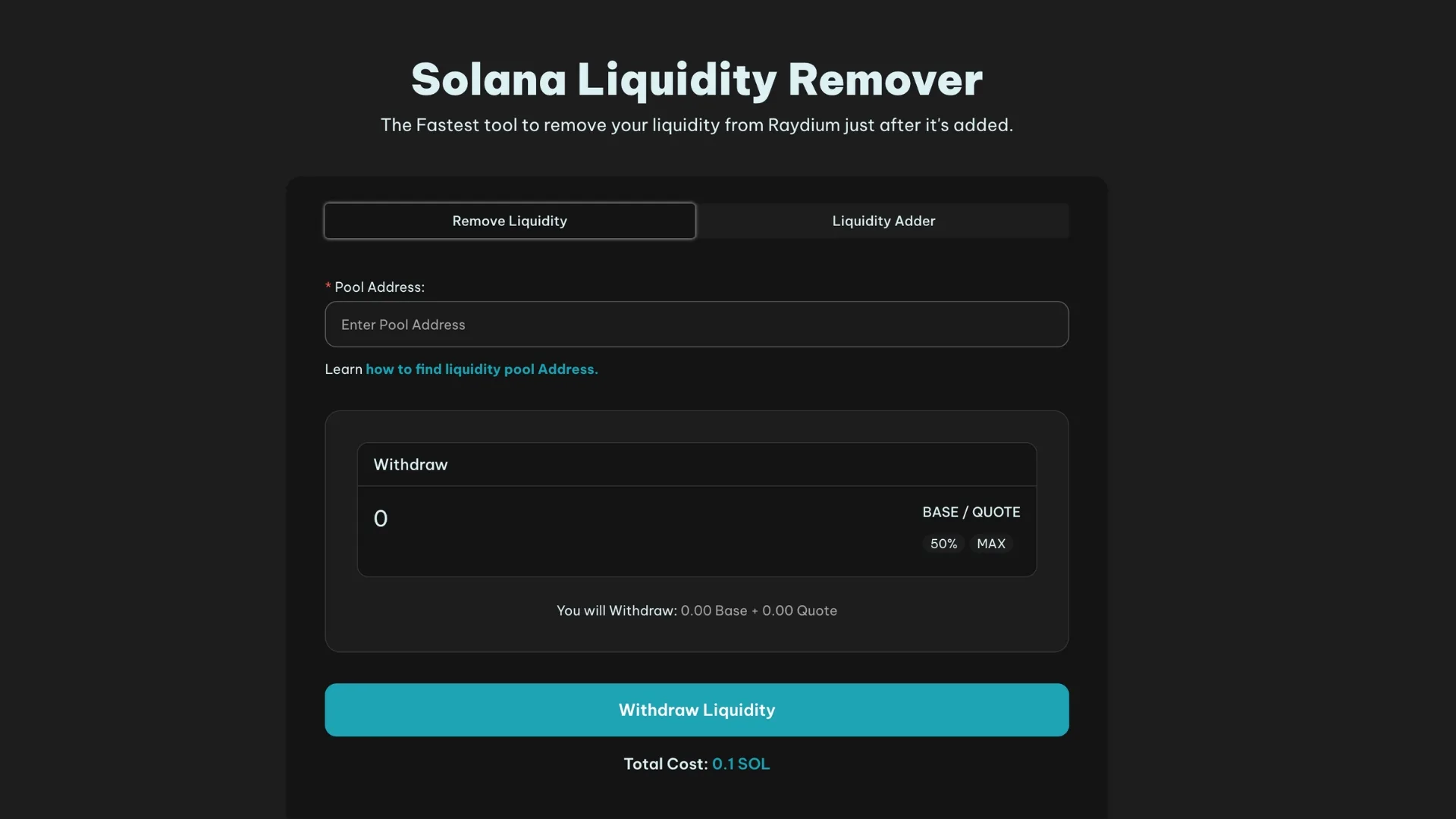
Once you’re in the app, here’s how to proceed:
- Select the pool address you want to remove liquidity from (see the tutorial below on how to find it)
- Enter the amount you want to remove
- Click “Withdraw Liquidity” and confirm the transaction
That’s it. You’ve successfully removed liquidity from your liquidity pool, and it will show up in your wallet.
Finding the liquidity pool Address (AMM ID)
When you’re ready to remove or withdraw liquidity on Raydium, you’ll need to identify the liquidity pool address. This is also referred to as the “AMM ID”, the identifier for an Automated Market Maker.
What Is the liquidity pool Address?
It’s a unique identifier tied to a specific liquidity pool on a DEX. It works as an address or reference that lets users and other protocols interact directly with that pool.
You can usually get your ID when you create the liquidity pool, since it’s displayed once the process is complete. If you didn’t copy it at the time, follow these steps:
- Open your wallet address on explorer.solana.com
- Find the liquidity pool creation transaction and open it by clicking on the “signature”. If you created it on Smithii, open the “sol transfers” tab and look for a 0.25 SOL transaction to the wallet shown in the image below.
- Scroll down until you reach instruction 5. Your liquidity pool address will be listed as #5 (“IdoId”)


Once you’ve copied your liquidity pool address, you’re ready to proceed with the liquidity withdrawal.
Is It Easy to Withdraw Funds from a liquidity pool?
Yes, withdrawing funds from a liquidity pool is very straightforward when you use a tool like the Solana Liquidity Remover by Smithii.
What Are the Risks of Removing Funds from a liquidity pool?
For starters, removing funds from the liquidity pool is a direct hit to confidence in the token and the team behind it. On top of that, pulling part of the reserve can trigger sudden price swings, putting all investors on alert. Without base tokens, no one can buy more coins.
At Smithii, we are not responsible for how users choose to use our secure web3 tools.
What Do You Need to Use the Solana Liquidity Remover?
To remove a liquidity pool, all you need is the liquidity pool address. Enter the amount to withdraw and click Withdraw Liquidity. That’s all there is to it in the Smithii Tools UI.
Don’t Launch Your liquidity pool Without Knowing This!
Get the 5 insider secrets the big players use to launch a liquidity pool


Industrial Engineer turned Solana trader. Marketing at Smithii and contributor to the $SHRIMP memecoin launch.



