

Pools Volume Bot: generate volume for your token on Robinhood Chain
The Pools Volume Bot generates real transactions and makers for your pools.trade token on Robinhood Chain. After launch, every dev hits the same wall: visibility depends on activity, but without activity nobody discovers the token, so the chart stays flat and the loop doesn’t break on its own.
This no-code tool breaks it for you by running automated buy and sell cycles on your own pool. In this guide we walk you through how to use a volume bot on Pools step by step, no jargon. Let’s get into it.
What is the Pools Volume Bot?
The Pools Volume Bot is a tool that automates buys and sells of your token from many wallets to generate volume and makers on your pools.trade pair. Pools is a Robinhood Chain launchpad with a quirk that works really well for a bot like this: your tokens trade in a Uniswap v4 pool from launch, with no bonding curve and no graduation to wait for.
Since the pool is live from block one, the bot can start moving volume right away. Every transaction it fires is a real on-chain trade settled on Robinhood Chain: gas is paid in ETH and every buy and sell shows up on the Robinhood Chain Blockscout explorer.
Why use a volume bot for Pools.trade?
Let’s be honest: nobody apes into a token that looks dead. Here’s what the Pools Volume Bot, also known as market maker bot, does for you:
- Real on-chain volume: every transaction runs on-chain, so activity kicks in the second you hit ‘Start Bot’.
- Fully adaptable to your strategy: you can set how many makers you want to generate or the full behavior of each maker.
- Organic behavior: each maker buys a random amount, holds the tokens for a few seconds and sells. You won’t see identical transactions or ‘boxy’ patterns.
- Three modes depending on your goal: you can push for a general boost, target a specific price, or configure everything by hand.
- Non-custodial: Smithii never holds your funds or stores the data you enter, and any leftover ETH goes back to your wallet.
New to the network? Check out our guide on what Robinhood Chain is and how it works first.
How to use the Pools Volume Bot step by step
Getting the Smithii Pools Volume Bot up and running takes about a minute and you don’t need to know how to code. Open the tool’s page and follow these steps:
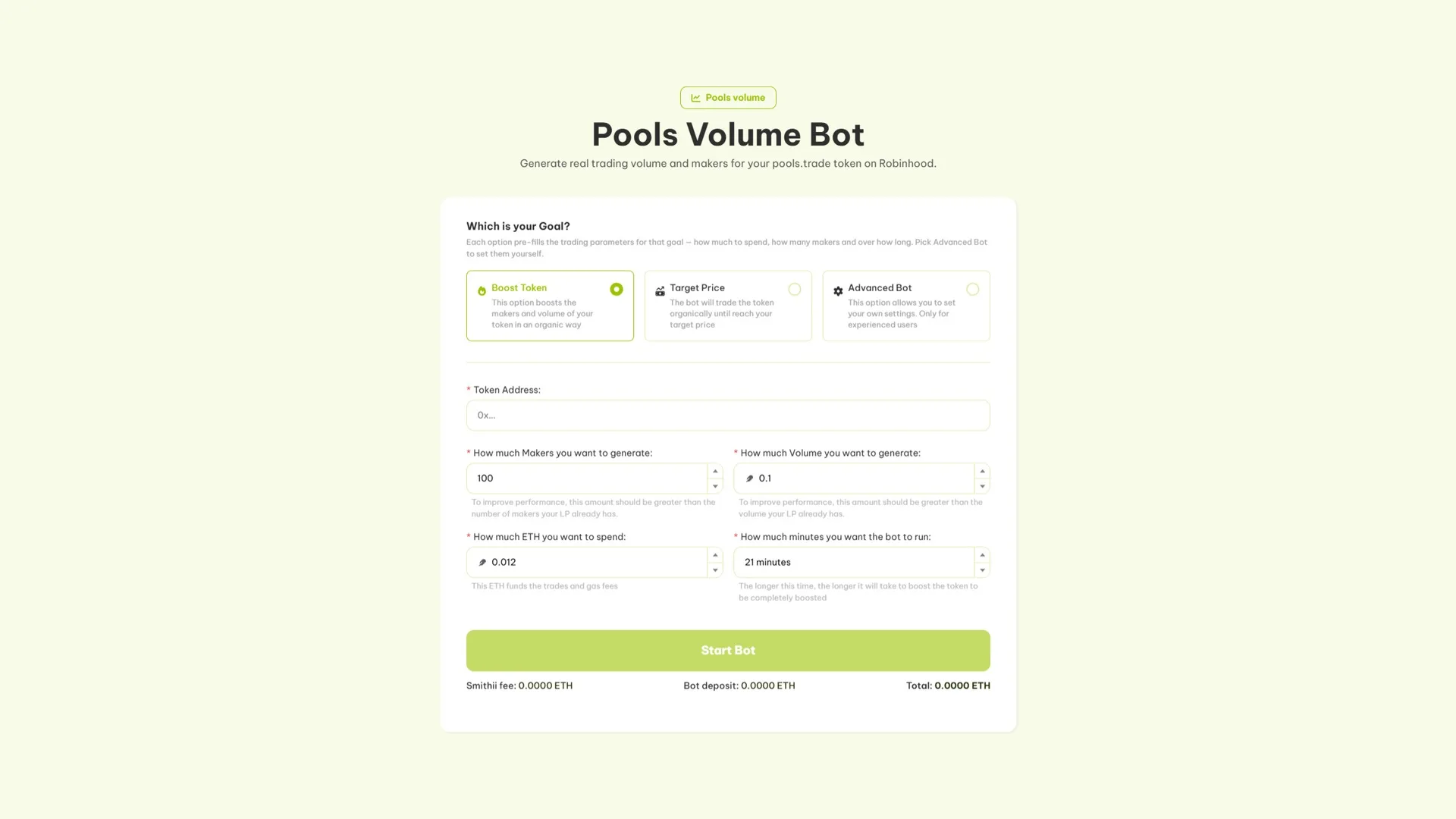
- Pick your goal. ‘Boost Token’ pushes makers and volume organically, ‘Target Price’ has the bot trade until it hits the price you set, and ‘Advanced Bot’ lets you fine-tune every parameter by hand. The first two are the easiest to set up.
- Paste the token address of your pools.trade token, the one you want to boost. If you’re not sure where to find it, our guide to getting a holders list shows you how to read it on Blockscout.
- Set how many makers and how much volume you want to generate. For the effect to actually show, both should be above what your pool already has.
- Set the ETH you want to spend. That ETH funds the trades and the gas for each transaction, so make sure your wallet has enough balance.
- The remaining parameters adjust to the number of makers. So you’ll get an estimate of how much ETH you’ll spend and the minimum time it could take.
- Hit ‘Start Bot’ and confirm in your wallet.
From there you can track every trade in the logs panel inside the Smithii Tools interface itself, and makers will start generating from the very first second.
Want to grab part of the supply before everyone else right at launch? Pair the volume bot with the Pools Bundler.
How much does the Pools Volume Bot cost?
The fee is 0.005 ETH per 100 makers, so it scales with the exact volume you generate, plus the ETH gas your transactions burn through.
If you bump it up to 200 makers, the total cost is 0.0050 ETH plus the ETH used to fund the wallets and cover network gas. Once the bot finishes generating the makers, it checks whether any ETH is left over and, if so, sends it back to you. Smithii doesn’t keep any funds or any tokens the bot buys.
The tool breaks down the Smithii fee, the bot’s deposit, and the total on screen before you confirm, so you know exactly what you’re paying before signing anything.
Is it legal to use a volume bot on Pools?
Use this tool to support your token’s transactions and reinforce organic movement, never to trick buyers and then pull the liquidity. At Smithii we’re not responsible for how anyone chooses to use our tools.
Manipulating the market with bots is illegal and heavily frowned upon, so always pair the bot with a real marketing strategy: social media, community, and a solid launch.
You might also want to check out our guide on the Robinhood Chain volume bot for any Uniswap-based pair, not just Pools tokens.
FAQ about the Pools Volume Bot
Ever since Pools went live on Robinhood Chain, we’ve been getting a ton of questions about using a Pools volume bot. These are the ones that come up the most.
Is the Pools Volume Bot safe?
Yes. The bot is non-custodial: Smithii doesn’t store the info you enter and doesn’t hold your assets, so you can use it with peace of mind. Any ETH left over after execution goes straight back to your wallet.
On which DEX does the Pools Volume Bot operate?
Pools.trade tokens have been trading on a Uniswap v4 pool since launch, so the bot routes its buys and sells through that same pool on Robinhood Chain. No bonding curve or migration to wait for.
What’s the difference between Boost Token, Target Price, and Advanced Bot?
‘Boost Token’ pushes makers and volume in a general way and it’s the default option. ‘Target Price’ runs until the token hits the price you set. ‘Advanced Bot’ lets you configure every parameter yourself and is built for anyone who already knows what they’re doing. The first two auto-fill the settings for you.
How much does the Pools Volume Bot cost?
It’s pay-as-you-go: 0.005 ETH per 100 makers, so you only pay for the volume you generate plus the ETH gas each transaction consumes. No monthly subscription, no developer to hire, and any leftover ETH goes back to your wallet.
Does the bot guarantee I’ll hit trending on Robinhood Chain?
Plenty of factors decide which tokens make it to trending, but the main ones are volume, number of makers, and transaction frequency. The bot boosts your odds, but doesn’t guarantee anything. Back it up with community activity, social media, and a strong launch on Pools.
What gas token do I need?
Robinhood Chain uses ETH as its native gas token, so keep enough ETH on hand to cover the pay-as-you-go fee, the ETH that funds the operations, and the gas for each transaction. Stablecoins on the network include USDG and USDe.
Conclusion
Bottom line: a flat chart kills a launch, and the Pools Volume Bot is the fastest way to breathe life into your pools.trade token on Robinhood Chain. Real buys and sells routed through your Uniswap v4 pool, makers you can set yourself, three modes depending on what you’re after, and not a single line of code.
Just launched? Grab part of the supply in the same block with the Pools Bundler, reinforce the movement with the Bundle Buy, and then keep the pace with the bot.
Start here if you haven’t launched yet: Pools Bundler on Robinhood Chain guide.
Subscribe to our newsletter to stay up to date on every release, get pro tips to squeeze the most out of each tool, and enter the Smithii giveaways.
All the guides for launching tokens on Robinhood are right here
Everything you need to launch and grow a project on Robinhood Chain, no code and with Smithii:
- Get started: What is Robinhood Chain · best wallets
- Create and launch: create a token · create a meme coin · create a liquidity pool
- Distribute: run a token airdrop · airdrop and testnet guide
- Manage and verify: add logo and socials · verify your contract · view the holders list
- Grow it: volume bot · market maker
- Bankr volume bot · Flap volume bot · Trench volume bot · Pons volume bot · Virtuals volume bot · Clanker volume bot · Hood bundler

Content creator and SEO contributor at Smithii. Systems Engineering student and crypto-tech enthusiast.



