

How to Remove Liquidity on Arc: Get Back Your token, Your USDC and the Fees You’ve Earned on Uniswap V3
Sooner or later you’ll need to move funds out of the pool, whether to rebalance, collect what you’ve earned, or close a chapter of the project, and knowing how to remove liquidity on Arc lets you do it with the exact numbers in front of you. You withdraw part of the position or the whole thing, and get your token, your USDC and any pending fees sent straight to the wallet.
In this post I break down exactly what you get back from a V3 position, how the process works with the Smithii tool, and why only the wallet holding the NFT can withdraw. I’ll also cover how a withdrawal affects trust in your token (if you’re the dev). Let’s get into it.
What you get back when you withdraw from a V3 position on Arc
Your liquidity on Arc sits inside a full-range Uniswap V3 position at 1%, represented by an NFT. That position doesn’t hold fixed amounts: it holds a share of the pool, and when you withdraw you get that share of each asset at the current price.
On top of that, you get the fees the position has earned. Every swap in the pool pays 1%, and your share piles up inside the position without you having to do anything. When you withdraw, the tool hands it all over at once.
| Since you deposited… | On withdrawal you get |
|---|---|
| Your token price went up | More USDC and fewer tokens than you put in |
| Your token price went down | More tokens and less USDC |
| The pool got volume | Plus the 1% fees you were owed |
How a pool works on Arc and why it uses an NFT
When you launch a token on Arc and create its pair with Smithii, a Uniswap V3 pool against USDC opens up and charges 1% on every swap. What’s different compared to other networks is how your contribution is recorded: instead of getting LP tokens, you get an NFT that represents your position, and it stays in the wallet that created the pool.
On V2 pools, like SunSwap on TRON or HyperSwap on Hyperliquid, everyone deposits under the same terms, so their shares are interchangeable and split into LP tokens, just like company shares. On V3 each position has its own terms, starting with the price range it operates in. Since no two are alike, each one is represented by an NFT, which is closer to a deed than to a stack of shares.
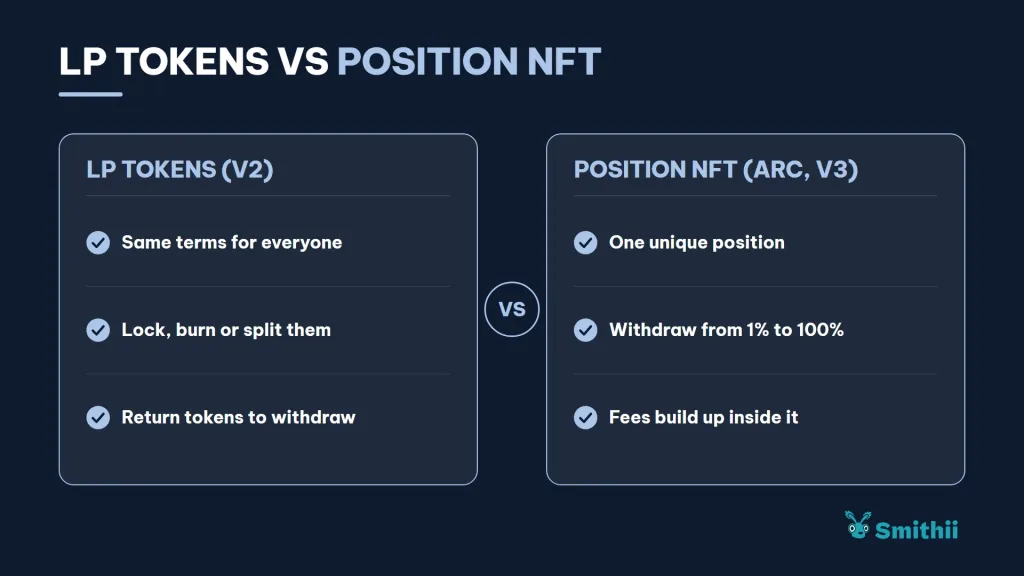
The positions Smithii creates cover the full price range, so when you withdraw you always get both assets back. A position you open yourself on Uniswap with a tighter range could return everything in just one asset if the price has moved outside that range.
In practice, this changes two things when you withdraw:
- There are no LP tokens to lock, burn or split: to withdraw, you reduce the position by whatever percentage you pick, from 1% to 100%.
- If you pull everything, the NFT is left empty: the tool tries to burn it, and if that step fails it’s no big deal, because the funds are already in your wallet.
You’ll also notice this on the Rug Check. The LP lock check is designed around LP tokens, and there’s no GoPlus data on Arc, so on a Smithii pool that check shows up as unverified.
How to remove liquidity on Arc step by step
The Smithii Liquidity Remover for Arc is a tool that lets you reduce or close your Uniswap V3 position from a simple form, with no need to hunt for the NFT in the Uniswap interface or crunch the numbers by hand. It reads your positions, shows you the preview, and sends the funds to your wallet. Inside the tool you’ll see this interface and need to follow these steps:
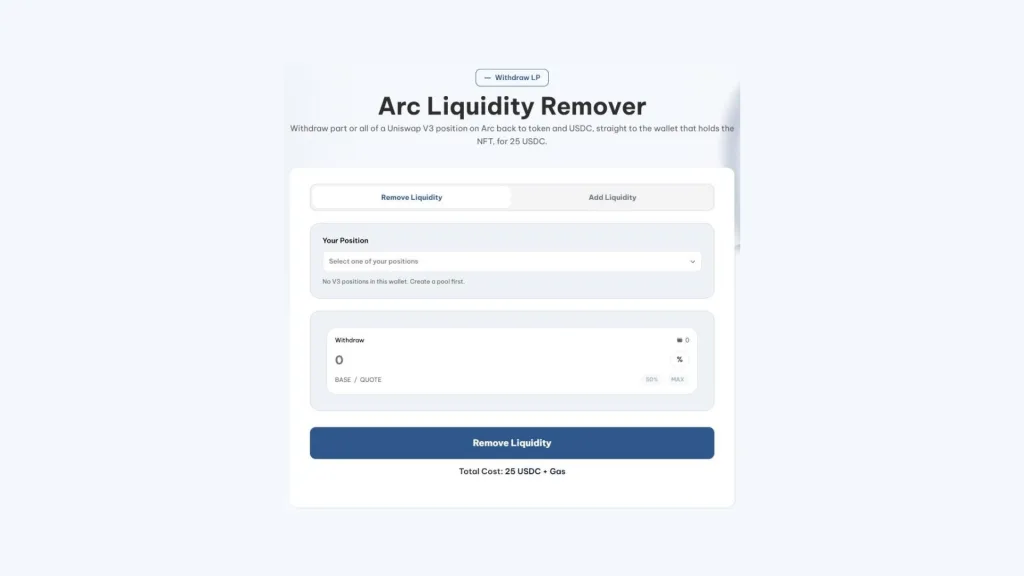
- Connect the wallet that holds the NFT: the Uniswap V3 position you want to reduce or close.
- Pick the position: the tool shows the Arc positions it finds in your wallet.
- Decide how much to withdraw: a percentage of the position or the full position.
- Review what you’re about to get: the amount of token and USDC, calculated at the pool’s current price.
- Confirm the withdrawal: both assets and any pending fees land directly in your wallet.
The token and USDC arrive together in the wallet that holds the NFT, with no middleman in between. If the connected wallet has no positions on Arc, the list shows up empty and there’s nothing to sign.
Partial or full withdrawal
If you pull a percentage, the position stays open with the rest and keeps earning fees. If you pull 100%, the pool is left without your liquidity; if nobody else has added any, your token will have no market until someone does.
Why only the wallet holding the NFT can withdraw
On Uniswap V3, owning the liquidity means owning the NFT. Whoever holds it in their wallet can grow the position, pull funds and collect fees, and nobody else can. That’s a protection, but it’s also a responsibility:
- Don’t send it to an exchange or a shared wallet, since transferring it means transferring all the liquidity inside.
- If your team uses multiple wallets, remember which one received the NFT when the pool was created, because that’s the only one that can withdraw.
- If you want to prove you won’t pull liquidity, sending the NFT to a lock contract is the way to make it verifiable.
The tool respects that rule: it only lists positions held by the connected wallet and sends funds back to that same wallet. There’s no way to pull someone else’s liquidity or redirect the output to a different address.
If what you actually need is more depth instead of less, check out how to grow your Uniswap V3 position on Arc.
How pulling liquidity affects your token on Arc
Less liquidity means every trade moves the price more, and a big withdrawal shows up instantly on the Arc explorer and on screeners. Buyers read it as a signal, often the worst one possible.
Rug Check flags liquidity below $1,000 as a risk, so a withdrawal that leaves the pool in that range changes the report on your token for anyone who looks it up. The way to avoid misreads is to announce beforehand what you’re doing and why, and not leave the pair empty longer than you need to.
It also helps to pull in tranches instead of all at once. A gradual reduction, announced and with a clear reason like funding development or rebalancing after a strong run, reads very differently than a pool that goes from thousands of dollars to almost nothing overnight. A pool that empties with no explanation is one of the reasons why 90% of tokens don’t make money.
Here’s how anyone can analyze the safety of a token on Arc, including yours after a withdrawal.
Pulling liquidity doesn’t reset your pool’s price on Arc
A common mistake is pulling all the liquidity thinking you can relaunch the pair at a different price. On Uniswap V3 that doesn’t work the way it looks, for two reasons:
- The pool still exists: even if you empty it, the TOKEN/USDC pair contract at 1% doesn’t disappear, and it keeps the last price it traded at.
- The pool creator won’t open a duplicate: the Smithii tool stops if there’s already a pool for your token at that fee tier, exactly so you don’t add liquidity at the wrong price.
If you add liquidity to that empty pool again, your funds will enter at the saved price, not the one you had in mind. That’s why it pays to think carefully about the starting price before creating the pair, and to treat a full withdrawal as the end of a chapter, not a reset button.
If what you need is to free up USDC for the project, a partial withdrawal is usually the better call: you recover funds and fees, and the pair keeps its market in the meantime.
How much it costs to pull liquidity on Arc
The Smithii fee is 25 USDC per withdrawal, plus network gas. Since gas on Arc is also USDC, the cost is exactly what you see before signing, with no dependency on any native token price.
The tool checks before you start that your balance covers the fee and gas, so you don’t get stuck halfway through for lack of USDC. If you’re short on balance, you can bridge USDC onto Arc from another network.
FAQ
How much does it cost to pull liquidity on Arc with Smithii?
The fee is 25 USDC, plus network gas, which is also paid in USDC. The tool checks before signing that your balance covers both.
Which wallet can pull the liquidity?
Only the one holding the position’s NFT. Funds go straight back to that wallet, never through Smithii.
Do I get the fees the pool generated?
Yes. When you withdraw, you get your share of both assets along with any pending 1% fees the position had accrued.
Can I withdraw just part of the position?
Yes. You pick the percentage and the rest stays in the pool within the same NFT, earning fees on every swap.
Why am I getting different amounts than what I deposited?
Because the position is split at the pool’s current price. If your token has gone up since you deposited, you’ll get more USDC and fewer tokens; if it’s dropped, the opposite.
Wrapping up
Once you know how to remove liquidity on Arc, you can trim or close your Uniswap V3 position knowing exactly what you’ll receive upfront, fees included, with funds landing straight in your wallet. What you actually get depends on the price at that moment, so double-check the preview before confirming.
If the token is yours, treat every withdrawal as a message to your holders. Liquidity is what holds trust together in a pair, and moving it without a word costs far more than the fee. If you need a plan for that message, check out how to promote a meme coin to your community.

Industrial Engineer turned Solana trader. Marketing at Smithii and contributor to the $SHRIMP memecoin launch.



