
How to Run a airdrop on Monad and Send Your token to Hundreds of Wallets
If you need to send a token in bulk to multiple wallets, the smartest move is learning how to run a airdrop on Monad. It’s the fastest, most effective way to push your project, reward your community when you already have a wallet list, or split the supply across multiple addresses.
In this guide I’ll walk you through the process of sending tokens on Monad to multiple wallets with zero technical skills or scripts required. Let’s get into it.
When You Actually Need a multisender on Monad
It all comes down to your goals, because not every token needs a airdrop. Sometimes it makes more sense to keep the supply in a single wallet. Here are some situations where a Monad multisender is the right call:
- Airdrops. Sending the token to active addresses to lock in holders and traction from day one is a common play, especially when you know how to promote a memecoin.
- Community rewards. Contests, engagement drives, ambassador programs: things that come around on a regular basis with a different set of wallets each time.
- Internal allocations. Sending out team or investor rewards in a single, verifiable move instead of a messy chain of one-off transfers that leaves room for misinterpretation.
- Migrations. Moving balances from an old contract to a new one while keeping every holder’s share intact.
Check out this guide to creating a token on Monad if you don’t have a token yet to run a airdrop on.
How to Run a airdrop on Monad, Step by Step
The distribution runs on Smithii’s Token Multisender for Monad, which takes the list you feed it and turns it into a single signed transaction, with no contracts to deploy or scripts to run. The moment you land on it, you’ll see a screen like the one below:
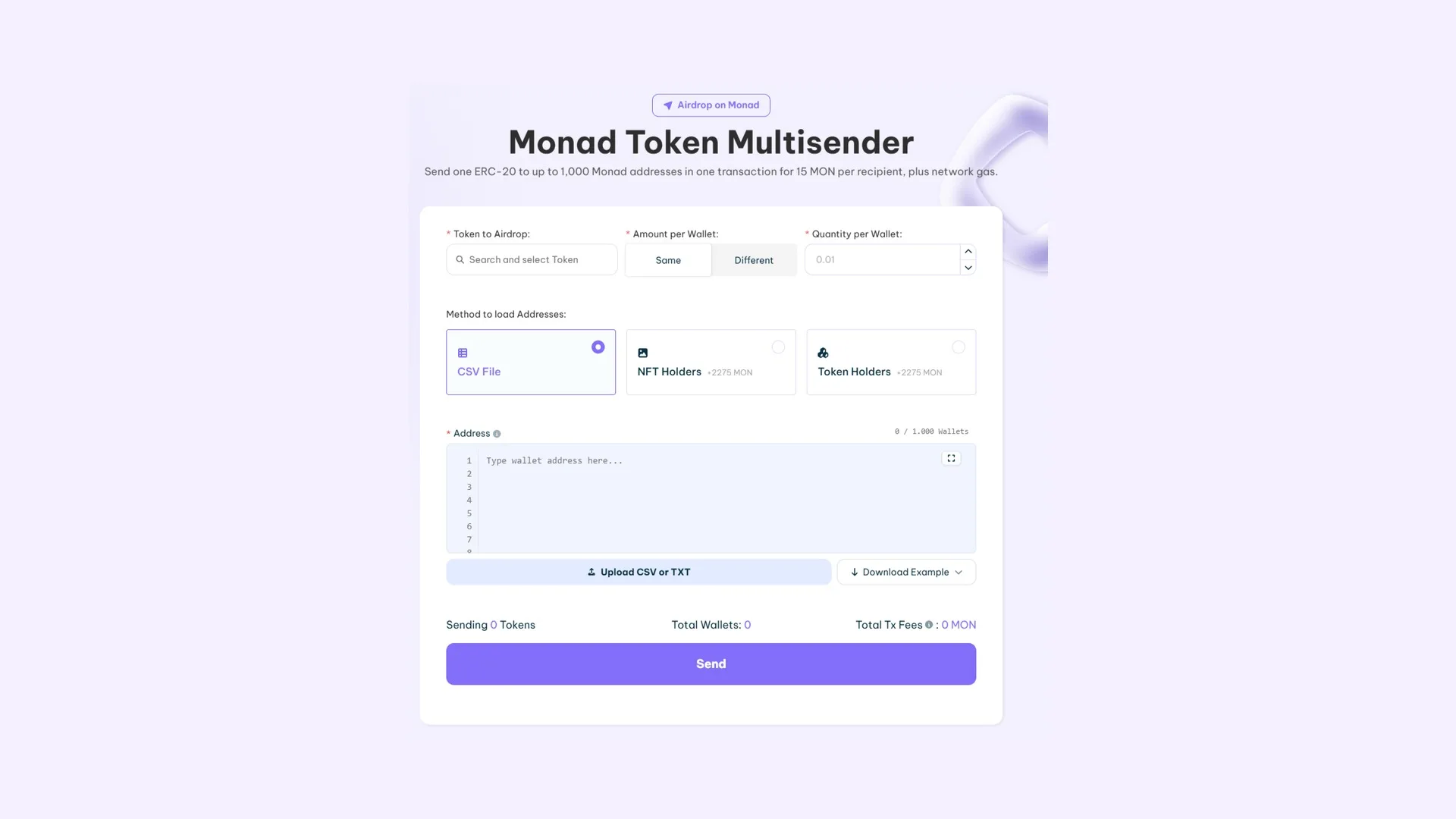
With your file double-checked and the wallet loaded with the token plus enough MON to cover the fee and gas, the flow comes down to five steps:
- Connect the sending wallet, loaded with the token and MON for the transaction.
- Specify which token you’re distributing using its contract address.
- Provide the list of addresses with their amounts.
- Run the transaction and sign it.
That’s how easy it is to run a airdrop on Monad using our tools. If you enter an invalid wallet, the interface will flag it too, so there’s no way to send tokens to a wallet that doesn’t exist. Keep in mind each send caps out at 1000 wallets: if your list is longer, you’ll have to split it and run the operation again.
How much each address on the list costs
The fee is 15 MON per destination address, plus gas for the distribution. Since it’s charged per recipient and not per send, the total climbs with every line you add: list size and budget are decided together, not separately.
Where to get wallets if you don’t have a list
The recipient field doesn’t assume you’re showing up with the file already done. Below the method selector there are three ways to fill it, and which one works for you depends on whether you already know who you’re sending to or you’re still figuring it out.
- A CSV or TXT file. This is the default option: you upload the file and each line comes in with its address and amount. The tool itself offers a downloadable example, so you don’t have to guess the format.
- Typing into the field. Addresses get typed or pasted one below the other, with the wallet counter updating on the fly. It’s handy for short distributions or to add a couple of recipients on top of what you’ve already loaded.
- The holders of a token. The tool checks who’s holding the contract you point to and dumps those addresses into the list, just like a snapshot of holders on Monad would on its own.
- The owners of a NFT collection. Same mechanic applied to a collection, along the lines of what the Monad NFT snapshot solves.
The last two are what fix the awkward case: you know exactly which community you want to reach but you haven’t written down a single address. Each one adds 2275 MON to the send cost, which is exactly what the snapshot tool costs on its own, and in exchange it saves you the detour of generating the list on another screen, downloading it, and uploading it again.
What to do after distributing your tokens
A well-targeted airdrop is one of the most profitable acquisition levers out there, and also one of the worst-executed if you don’t plan properly. To keep your project moving after running a airdrop on Monad, consider doing this:
- Check what the actual distribution looks like, using a snapshot of holders on Monad. You can also keep it as a wallet history to compare against down the line.
- Make sure the token is actually usable. Without a liquidity pool, whoever receives it can neither sell nor buy it.
- Keep the activity going to boost your visibility. Learn how it’s done in the Monad volume bot guide.
FAQ
What’s the price of a token bulksend on Monad?
It’s 15 MON for every address included in the list, plus gas for the distribution. It’s not a flat fee, so the final cost depends on how many people you’re sending to and it’s worth calculating before you consider the file closed.
Is there an address cap?
The max is 1000 wallets per send. The tool doesn’t split the list automatically, so for larger distributions you’ll have to break it up and run it multiple times.
Can I send different amounts to each address?
Yes. Each line on the list carries its own address and its own amount, so you can stagger amounts within a single send.
Can a send that’s already been executed be reversed?
No. A transfer confirmed on the blockchain is final, which is why the pre-send summary deserves a careful read.
Where do the tokens come from?
From the wallet you connect, which needs to hold both the token to distribute and the MON needed for the fee and gas.
Conclusion
Once you know how to use the Monad Multisender, you can distribute a token across multiple wallets without any trouble. Whether it’s to reward the wallets that engage with your project, to run an outreach campaign after pulling a snapshot of projects similar to yours, or because you need to distribute the supply.
Execution is trivial and cheap; the file is what you want to double-check. Once the list is clean and you’ve accounted for the 1000-address cap, all that’s left is signing with your wallet and you’re done.

Content creator and SEO contributor at Smithii. Systems Engineering student and crypto-tech enthusiast.



