




How to create a token on Monad: the complete, up-to-date guide (Pro)
Figuring out how to create a token on Monad is fast and painless with the Smithii dApp. You don’t even need to write a single line of code. The whole process is visual, and you can bolt on unique features that seriously level up your launch.
Unlike Solana, token metadata can’t be edited after launch. That means the ticker and the name are locked in forever.
With that said, in this guide I’ll walk you through how to create a token on Monad step by step, along with the best practices to pull it off. Whether you’re building a utility token or a memecoin, keep reading.
What Monad brings to a new token
Monad is an EVM-compatible chain whose pitch isn’t offering different features, but running the same ones way faster by processing transactions in parallel instead of one after another.
For anyone launching a project, that translates into something concrete: mechanics that get expensive on other networks stop being cost-limited here. Distributing to thousands of addresses, keeping constant movement on a pair, or running on-chain logic frequently are all things that fit within budget here.
And since the environment is standard EVM, there’s no learning curve: same wallets, same token standard, same tools you already use.
What you need before creating a token on Monad
As with any network, there are a few basic requirements to have ready before creating your own token on Monad, and they are these:
- An EVM wallet with the Monad network added. MetaMask, Rabby, or any wallet that supports WalletConnect.
- MON in that wallet to cover deployment, gas, and follow-up steps.
- Name, ticker, and supply figure decided. Everything else can be figured out inside the tool.
How to create a token on Monad step by step
Everything happens in the Smithii Token Creator for Monad, in a single transaction. In short, it’s a tool that lets you launch a token without writing code, in a genuinely fast, efficient, and secure way. Once you’re in the interface, you’ll see something like this:
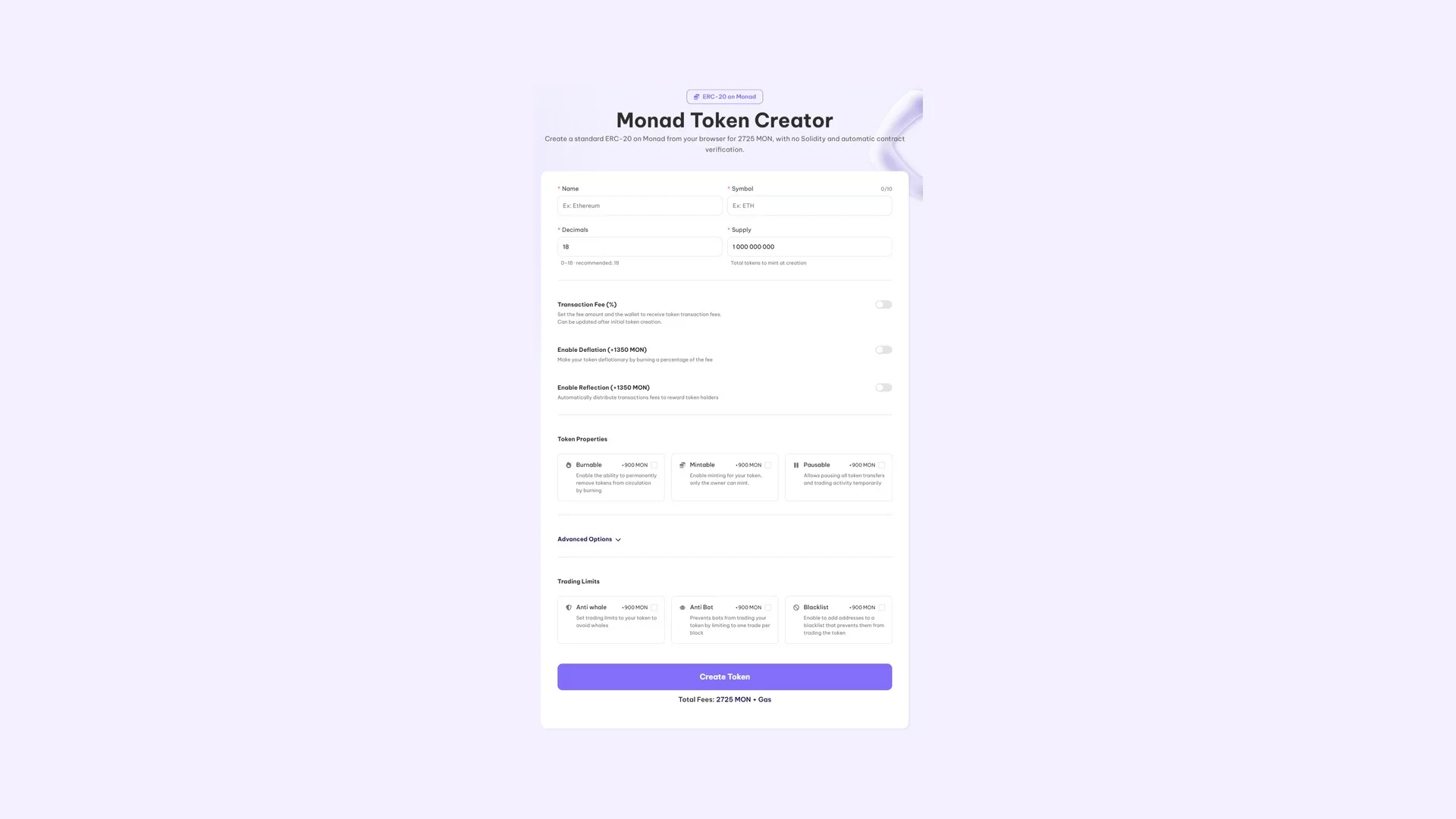
Once you’re here, here’s what to do:
- Connect your wallet and verify the network. The address that signs is the one that stays in control of the contract.
- Set the name and ticker. Check that the symbol isn’t already being used by another project on the network, because sharing a ticker with someone else down the line is a headache.
- Set decimals and supply. Eighteen decimals is the EVM convention; the mint happens once and the full total lands in your wallet.
- Pick the contract’s capabilities. This is where it pays to be deliberate. We’ll cover each option in the next section, but you can launch a basic token with no extra features at all.
- Check the total and click ‘Create Token’.
After signing the transaction that pops up in your wallet, the token will show up in that same wallet. You can also choose the initial distribution across multiple wallets by selecting that advanced option, but we’ll get into all of this later. If you want to jump straight into creating your token on Monad, hit the button below.
How much it costs to create the token
Deployment is 2725 MON + network gas fee + optional features. Each optional feature has its own price, so a contract with no add-ons only pays the base figure. The tool calculates your total before you approve anything.
Extra features worth considering
Our dApp doesn’t stop at the basics. We also add several optional features that stack onto your token deployment if you want them. All of these can be turned on post-launch if you’d rather do that, through the Token Manager.
Basic options
Transaction Fee (Free)
Charges a percentage on every buy and sell and splits it across up to 10 wallets that you define, with whatever percentage you want on each. Useful for funding marketing or treasury without having to sell your own supply. The percentage can be adjusted later.
Deflation (+1350 MON)
Burns a portion of every transaction, permanently removing it from circulation. Useful if your project leans on scarcity: the more the token trades, the less supply is left.
Reflection (+1350 MON)
Automatically distributes part of the fees among holders, with a minimum balance required to qualify. Useful for rewarding those who hold and making short-term trading less appealing.
token Properties
Burnable (+900 MON)
Lets you destroy tokens manually whenever you decide. Useful for announced burns: project milestones, buybacks, or clearing leftover supply from a airdrop.
Mintable (+900 MON)
Lets you mint new supply after deployment, and only from the owner wallet. Useful for phased emissions or reward programs. If your pitch is fixed supply, you don’t need this.
Pausable (+900 MON)
Freezes all transfers and trading on the token while it’s active. This is the emergency button if you spot an exploit or something odd in the pool, instead of watching it drain.
Advanced Options
Multi-Wallet Distribution (+900 MON)
Splits the supply across up to 10 wallets in the same deployment, with the percentage you assign to each one. Useful for setting up your tokenomics from block one (team, marketing, airdrop, liquidity) without chaining dozens of transfers.
DEXTools Socials + Banner (+13600 MON)
Sends your website, Telegram, Discord, and X to DEXTools along with the logo and banner, straight from the form. Useful when you want the token to show up with a full brand from day one instead of looking like an anonymous contract.
Create a Liquidity Pool (+900 MON)
It spins up the pool in the same flow, pairing your token against MON, and shows you the opening price before you sign. Handy so the token is tradable the moment it exists. The MON you pair isn’t spent, it stays locked in the pool.
Trading Limits
Anti whale (+900 MON)
Caps how much a single wallet can buy and accumulate: per-transaction limit, cooldown between trades, total cap, and how many days it stays active. Useful in the early days, when the pool is at its most fragile.
Anti Bot (+900 MON)
It caps the token at one transaction per block, which is exactly what breaks the mechanics sniper bots rely on. Useful right when you’re seeding liquidity, so a bot doesn’t scoop up the first buy.
Blacklist (+900 MON)
Blocks specific addresses from trading the token. Useful once you’ve spotted bots or wallets manipulating the price.
Why token Metadata Can’t Be Edited on Monad
Monad is EVM-compatible, so it follows the ERC20 standard for its tokens, which by design doesn’t allow changing the name or ticker after launch. On the other hand, you can tweak your token’s identity on platforms like DEXTools if you want to, but that’s fully optional.
Everything else (burns, rewards, per-address limits, exclusion lists, initial distribution, and so on) only makes sense if there’s a real use behind it. A contract with everything switched on doesn’t signal ambition, it signals indecision. And if your plan involves shrinking the circulating supply, first check how a buyback and burn works: you may need the strategy, not the feature.
What Comes Next After Minting a token on Monad
An isolated contract is something nobody can buy. These are the steps that turn it into an actual project:
- Set a price and enable trading by opening a market: how to create a liquidity pool on Monad.
- Distribute supply, send rewards, or run an airdrop: use the Monad multisender.
- Keep activity and transactions flowing while your community shows up, or complement organic volume to rank better on screeners: run a Monad volume bot.
- Lock down permissions once there are no more tweaks left: renounce ownership on Monad.
Before announcing anything, it’s worth checking your Monad token the way a buyer would and fixing anything that comes up red.
Once the pair starts moving, it’s time to get the word out, and that’s a comms job: we break it down in how to promote a meme coin. Listing requests on CoinMarketCap and CoinGecko are free and hit much harder when you show up with a market that’s already live.
To track down your contract address later on, here’s the guide on how to find the contract address of a token.
FAQ
Do I need to know Solidity?
No. The tool deploys a pre-audited contract based on the details you enter, so you don’t write or compile anything.
Does the Monad token work with regular wallets?
Yes. Since Monad is EVM-compatible, what you deploy is an ERC-20, and any wallet, explorer, or protocol in the ecosystem recognizes it without any tweaks.
How much does it cost to deploy the contract?
It’s 2725 MON plus network gas, which on Monad is a tiny fraction of the total. Optional features have their own pricing.
Can I change the token name or symbol later?
No, these fields are immutable by the nature of ERC20 tokens. What you can change in a token’s identity is the metadata on DEXTools.
Which wallet should I sign with?
One you plan to keep around, because that address becomes the contract owner and will be the one running any admin functions down the line.
Conclusion
Now that you know how to create a token on Monad, you’ve got a clear path to launch as many projects as you want, with no coding and with Pro features that plug straight into your token’s contract. Do whatever you want with your token from here on out: launch a liquidity pool, get on listing platforms, share your token on forums and social media, give it utility, or wire it into your own ecosystem.
Add only the features you’ll actually use, leave the rest out, and spend your energy on what you can still fix on the fly, which is everything that comes next.
To see how this step fits into the bigger picture, check out the definitive guide for devs on Monad with the full launch from start to finish, from tokenomics all the way to aggregators.

Content creator and SEO contributor at Smithii. Systems Engineering student and crypto-tech enthusiast.



