

How to extract the holders of a token on Monad and get the exact snapshot of who holds it
Almost every call you make on a project runs on rough numbers: how many holders you think you have, how you assume the supply is spread out, who you guess actually cares about what you’re building.
Knowing how to extract the holders of a token on Monad replaces guesswork with a real list. It gives you a CSV with every address holding that token at the moment you run it, ready to work with.
And it works on any token on the network, not just yours. That’s where it gets interesting.
What the holders list of a token on Monad is good for
The first is looking inward: knowing how many holders your token actually has and who they are. Not the numbers you estimate, but the full list of addresses at a specific moment, which is what you can cross-check against what you tell the outside. It’s info others are going to look at anyway, so better you see it first.
The second is looking outward, and it gets used a lot less: pulling the holders list of a project similar to yours. Those addresses belong to people who’ve already proven, with real money, that they buy things in your category. You won’t find a better-defined audience than that.
How to extract the holders of a token on Monad step by step
The extraction runs through the Token Snapshot by Smithii for Monad, which walks the state of the ERC-20 contract you point it at and returns a CSV with the addresses holding it at that instant. It shares a screen with the collections snapshot: they’re two tabs of the same tool. The moment you open it you’ll see this:
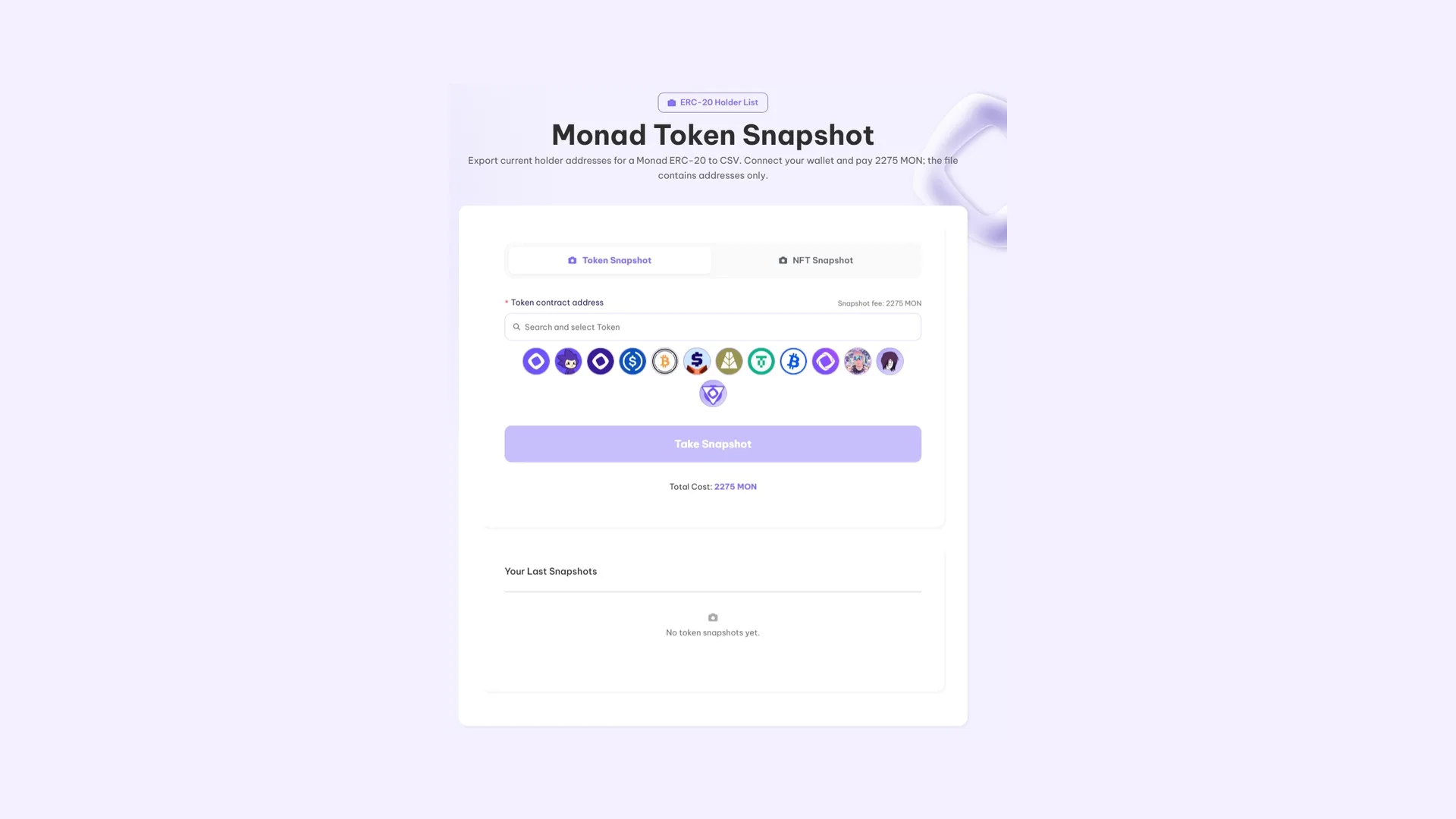
With the contract address on hand and some MON in your wallet to cover the fee, it’s four steps:
- Connect your wallet, which only needs MON for the fee.
- Point to the token by pasting its contract address.
- Run the extraction and wait for it to walk the full state.
- Download the CSV with the resulting addresses.
How much extracting the holders list costs
It’s 2275 MON plus gas. It’s one of the higher fees on the network and there’s a reason: the tool walks the entire state of the token, not a sample and not the top results.
From snapshot to airdrop: the full sequence
On its own, a snapshot is just a file. Combined with a distribution, it becomes an acquisition channel:
- Pick a token close to yours, not the biggest one but the closest match in theme or buyer profile.
- Extract its holders with this tool.
- Load that list into the distribution and a fraction of your token lands with them: how to use Monad’s multisender.
- A share of them will come check what they received, and that’s qualified traffic you didn’t pay for in ads.
What determines the outcome is fit, not list size. A huge list disconnected from what you do is expensive noise. This approach and others like it are covered in how to promote a meme coin.
What to check in the holders list you get
- How many addresses total. If the list is quite a bit shorter than what you claim publicly, that’s the first thing to fix: distribute before going out to look for buyers and consider renouncing ownership.
- Whether those holders can actually trade. Having holders without an open pool doesn’t mean much.
- How it changes over time. One snapshot tells you nothing; two do.
A concentrated distribution shows up in almost every diagnosis of why 90% of tokens don’t make money. Catching it early is the difference between fixing it and rationalizing it.
FAQ
Can I run the snapshot on someone else’s token?
Yes. The balances of a token are public info on the blockchain, so the tool works with any contract on the network, whether it’s yours or not.
How much does the snapshot cost on Monad?
It costs 2275 MON plus gas. It’s one of the higher fees in the catalog because the tool walks the entire state of the token instead of just a sample.
What format does the data come in?
A CSV with just the addresses, no balance column. It plugs straight into the multisender when you’re sending the same amount to everyone; if you want different amounts, you add that column yourself.
Does it capture every holder?
Yes. It walks the full state of the token at the exact moment you run it. That’s why it’s a snapshot of that instant, not of a period.
How often should you run it?
Depends on what you want to measure. Two snapshots spaced apart in time are what tell you whether your holder base is actually growing or just changing hands.
Wrap-up
A snapshot doesn’t fix anything on its own: it’s information. The value is in which token you pull it from and what you do with it afterward.
Used internally, it tells you whether your project is where you think it is. Used externally, it puts you in front of people who already buy what you’re offering.
For an ERC-20 deployed on Arc, the equivalent tool and its limits are covered in the guide on how to pull the holders list on Arc.

Content creator and SEO contributor at Smithii. Systems Engineering student and crypto-tech enthusiast.



