

How to Download the Holders of an NFT on Hyperliquid: Full Guide
If you need a complete list of wallets holding a specific NFT, the smartest move is to learn how to download the holders of an NFT on Hyperliquid using the NFT Snapshot, the tool from Smithii that lets you export a CSV with the full holder list of an NFT.
Plus, all you need is the contract address of the NFT collection and that’s enough to pull the list. No code, no scripts, no hassle.
In this guide I’ll walk you through how to use the NFT Snapshot for Hyperliquid and what you can do with the list afterward. Let’s get into it.
How to Download the Holders of an NFT on Hyperliquid Step by Step
The first thing you need to do is head over to the NFT Snapshot from Smithii for Hyperliquid. In that section you’ll find more Hyperliquid tools built to help devs launch their own projects. You’ll see an interface like the one in the image below, and from there just follow these steps:
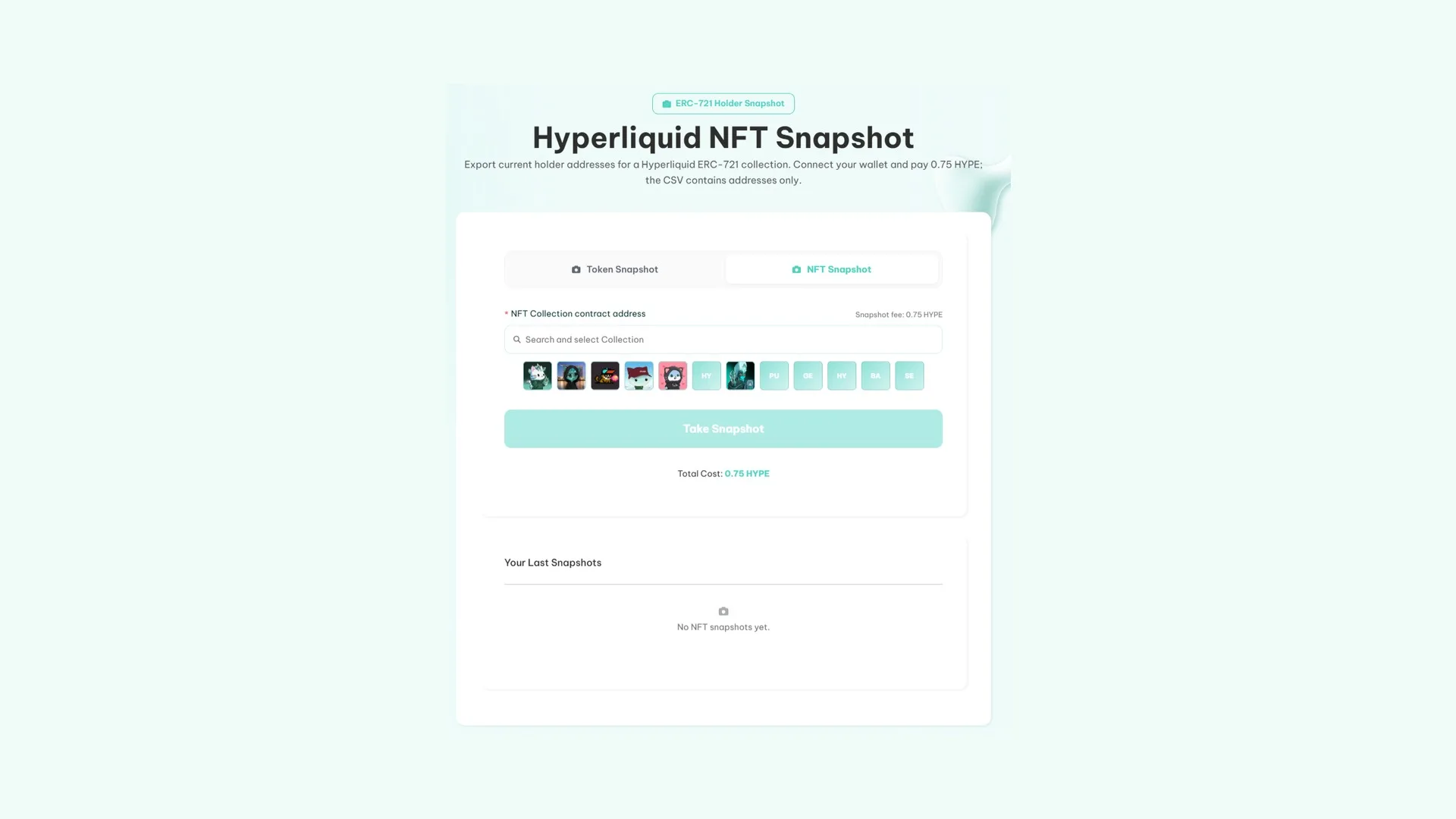
- Connect your wallet. The most common is MetaMask, but you can also use Coinbase Wallet, Rainbow, Rabby, and others.
- Paste the NFT contract address. We cover the process to find the contract address of an NFT collection in another guide, in case you don’t know how.
- Run the snapshot by clicking ‘Take Snapshot’ and confirm the transaction from your wallet.
- Download the file with the resulting wallets.
How much does the Hyperliquid NFT Snapshot Tool cost
Running the tool costs 0.75 HYPE plus network gas fees, the same rate as the Hyperliquid token snapshot: both scan the full contract state.
What You Can Do With the Wallets After the snapshot
Now that you have the holders list of an NFT collection on Hyperliquid, you can run more targeted marketing for your project. Some options on the table:
- An airdrop to that community, by loading the list into the Hyperliquid multisender.
- A whitelist for your launch, using ownership of the piece as the criteria.
- Rewards for those still holding, by comparing two snapshots taken at different times.
An NFT collection needs a compatible token running alongside it
Launching a collection usually comes with a token on the same network that adds utility to the NFT. That way holders are incentivized to keep the NFT they own, and it provides a rewards mechanism for completing activities.
That’s why we recommend launching a token that boosts the utility and visibility of your NFT collection. To do it right, keep these key points in mind:
- The token exists: how to create a token on Hyperliquid.
- It’s tradable: how to create the liquidity pool.
- The pair has activity when traffic hits: the volume bot.
FAQ
How is it different from the token snapshot?
The token one returns wallets holding a fungible token balance and the amount. The NFT one returns who owns pieces of a collection, which is usually a more defined and stable community.
Do I need to be the collection creator?
No. NFT ownership is public information, so you can pull the snapshot from any collection on the network.
How much does a NFT snapshot cost on Hyperliquid?
0.75 HYPE plus gas, the same rate as the token snapshot.
Does a wallet with multiple pieces show up more than once?
No, each wallet appears only once, which prevents the same holder from claiming multiple times if you use the list for distributions.
Can I use it for a whitelist?
Yes, that’s one of the most common use cases: owning a piece from the collection acts as the eligibility criteria.
Final thoughts
The snapshot of an NFT gives you access to something a token snapshot can’t: communities with real identity and holders who don’t vanish week after week. A smaller audience, but significantly more qualified.
Pick the collection based on genuine alignment with your project, and the list stops being just a file and starts being people who actually show up. That way you end up with a list of people who could also become part of your own collection.
A collection deployed on Arc follows the same logic but gives you a different output, and we cover it in the snapshot guide for Arc.

Content creator and SEO contributor at Smithii. Systems Engineering student and crypto-tech enthusiast.



